Video Formats: The Different Types of Video Files Explained
What Is a Video File Format, and Which One Is the Most Compatible?
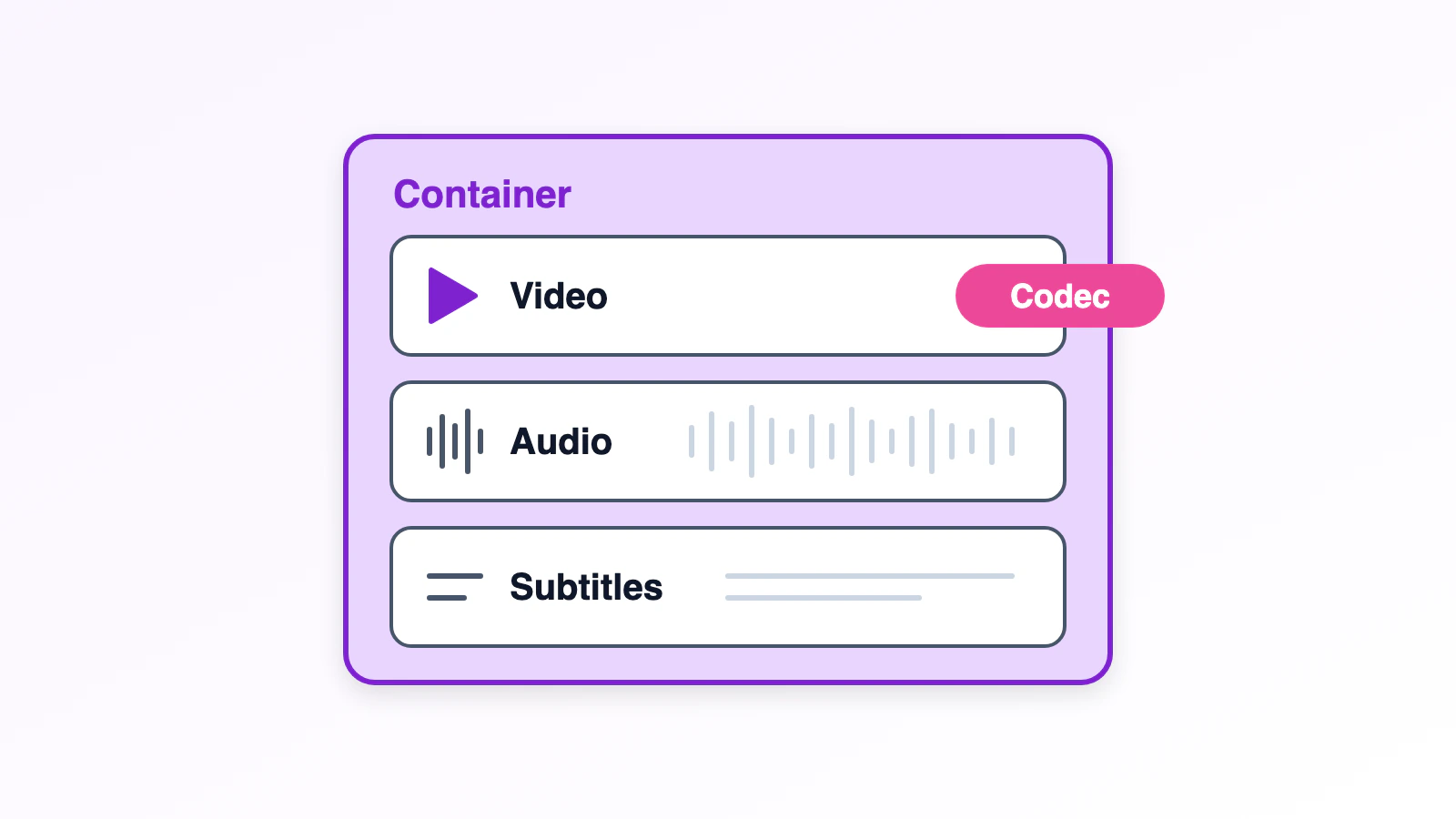
A video file format combines a container (the .mp4, .mov or .webm file) with the codecs that compress its video and audio. For compatibility, MP4 is the usual pick: MDN's guide to media containers lists it as supported by all browsers. The codec inside still decides whether a given device can play the file.
Your phone saved the video as .MOV and your editor won't open it. The extension takes the blame, but what's inside the file matters just as much.
MP4 or MOV? Use MP4 to share or publish a video. Keep MOV while your iPhone, your Mac or your video editing software is still working with it, and convert when something refuses it.
Container vs. Codecs: The Two Parts of a Video Format
The container is the box. Technically, it's a multimedia container format: a single file that stores the video data and the audio side by side. It can also carry subtitles and metadata (details such as the title or the recording date).
Inside a video format, the codecs do the compression. A codec encodes the picture or the sound into less data, then decodes it at playback. H.264, HEVC (also called H.265), VP9 and AV1 are video codecs; AAC and Opus compress audio.
MDN's own definition lists these parts: the codecs, the container format "or file type," and optional extras such as subtitles or metadata. File extensions name the container, never the codec. An .mp4 file can hold H.264 or HEVC video, and the same VP9 video can sit in several containers, WebM included.
Is H.264 the same as MP4? No. H.264 is a codec, and MP4 is one of the containers that can carry it.
File size and video quality come from the codec and the bitrate (the amount of data per second of video), not from the extension. MDN puts it plainly: "Higher bit rates inherently lead to larger output files," and quality generally improves with them. Two files of the same clip, with the same extension, can therefore have very different file sizes.
Codecs also differ: some offer more efficient compression than others. Apple says HEVC offers better compression than H.264, so it uses less storage at the same visual quality. The catch: HEVC support still depends on the device and the browser. The comparison of HEVC vs H.264 compression and compatibility weighs that trade-off.
Common Types of Video File Formats: MP4, MOV, WebM and MKV
There are different types of video formats, from current containers to leftovers from old PCs. The four common video file types below are the current ones: MP4, MOV, WebM and MKV.
MP4
MP4 (formally MPEG-4 Part 14) is an ISO standard, ISO/IEC 14496-14, according to the Library of Congress. It grew out of the QuickTime file format. The Library of Congress lists two extensions: .mp4, and .m4a for files that hold audio only.
MDN names MP4 and WebM as probably the most commonly used containers on the web. It describes MP4 as a popular video container that "supports several of the most-used codecs and is broadly supported."
MOV
MOV is the Apple QuickTime movie format. MDN is blunt: browsers play it only in older versions of Safari, plus browsers that supported the QuickTime plugin. Because its support sits mainly on Apple devices, MDN adds, it's no longer widely used on the internet.
On a Mac, Apple says apps such as Photos, iMovie, Safari, Keynote and QuickTime Player "work with many media formats." It also warns that older or specialized formats might not work as expected.
With MOV files from an iPhone, check the codec first. Set to High Efficiency, an iPhone records space-saving HEVC; with Most Compatible, new videos use H.264. The comparison MOV vs MP4: which video file format to use covers when to keep each one.
WebM
WebM was first introduced in 2010 and, in MDN's words, is "now widely supported." MDN lists it as supported by all web browsers and notes that it is based on Matroska, the format behind MKV. When vidmini converts an MP4 to WebM, it writes VP9 or VP8 video with Opus audio. To pick one of the two for a web page, read WebM vs MP4 for web video.
MKV
MKV is the Matroska video file. Matroska.org defines it as an envelope that can hold many audio, video and subtitle streams, and stresses that it is not a codec.
MDN doesn't list MKV among its web containers. That's an absence from a list, not proof that a browser refuses the file. vidmini's browser tools open MKV natively, like the three formats above. When a TV or a phone won't play your MKV, MKV vs MP4: which format to keep or convert helps you decide.
AVI (Audio Video Interleave), WMV (Windows Media Video) and FLV: Older Formats You Still Run Into
These three containers come from an older generation of desktop video. You still find them in old folders: files from old PCs, clips saved from Flash-era websites.
AVI
AVI stands for Audio Video Interleave. AVI files show up in DivX or Xvid videos (both are video codecs). MDN mentions the AVI format only in passing, as a container you may also encounter, with no browser support listed.
WMV
WMV stands for Windows Media Video. Expect it on videos saved on old PCs.
FLV
FLV stands for Flash Video, the format of old Flash videos from the internet. Neither WMV nor FLV appears on MDN's page about media containers.
vidmini's browser tools still open all three, plus other formats such as MPEG/VOB, 3GP and OGV. They go through a fallback converter that also runs on your device. It's slower, downloads a 32 MB converter from vidmini.com the first time, and accepts files up to 1 GB.
An old container doesn't mean poor video quality. As with any container, the codec and the bitrate inside decide.
Types of Video Formats and Where Each One Plays
The table sums up what MDN documents for browser playback and what vidmini's browser tools accept. Read it with one caveat: a supported container doesn't guarantee playback, because what's inside counts too.
| Format | Extension | Browser playback (MDN) | In vidmini's browser tools |
|---|---|---|---|
| MP4 | .mp4 | All browsers | Opens natively |
| MOV | .mov | Only older Safari, plus browsers with the old QuickTime plugin | Opens natively |
| WebM | .webm | All browsers | Opens natively |
| MKV | .mkv | Not on MDN's list | Opens natively |
| AVI | .avi | Mentioned in passing, no support listed | Fallback converter, slower |
| WMV | .wmv | Not on MDN's list | Fallback converter, slower |
| FLV | .flv | Not on MDN's list | Fallback converter, slower |
What format is better than MP4? There is no single best video format, only a better fit for the job. Choosing the right format starts with where the file goes next: a website, a phone, an editor or a TV.
Upload guidelines vary across different platforms, and they can change. On platforms like YouTube or a social media app, check the help page before you convert.
When a device, an editor or a platform refuses your file, convert your video to MP4, MOV or WebM in your browser. Nothing is uploaded, there's no account and no watermark: the file is read and converted on your device.
When the streams already fit, as with a MOV holding H.264, vidmini copies them into the new container. There's no re-encoding (compressing the video again), so there's no loss of quality. Otherwise it re-encodes, to H.264 video and AAC audio when the target is MP4.